
Probe locations
Updated 2026-10-09 · Pharos 1.0.0
By default every check runs from the server Pharos is on, so one broken route between that server and your service looks like an outage. A probe location is a second Pharos installation on another network that runs the same checks and reports what it saw. Each location has one vote, and a strict majority decides whether the check is up or down.
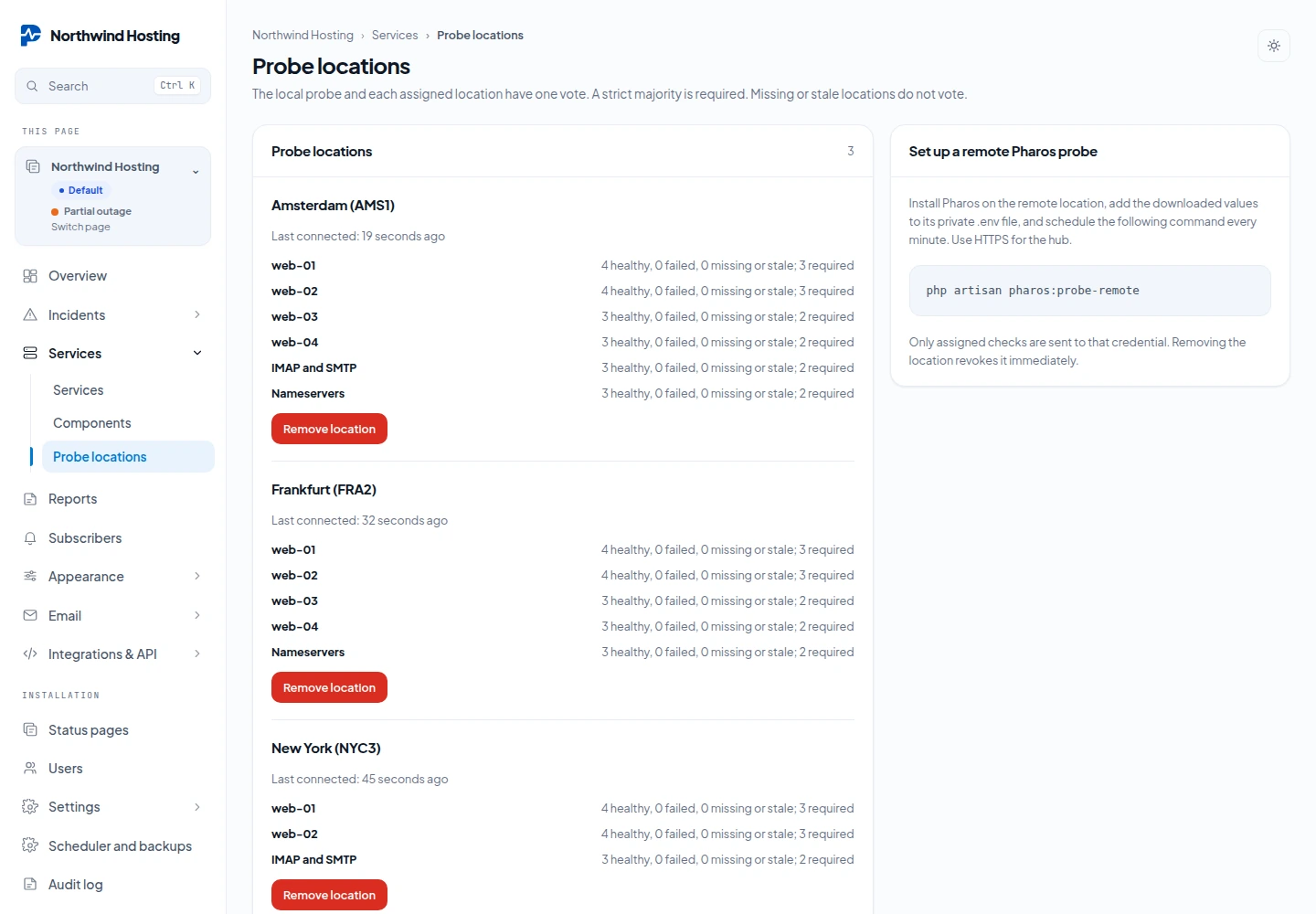
Add a location
The installation that holds the status page is the hub. The other installation only runs checks for it.
- On the hub, open Services → Probe locations. The screen is there for administrators and for people with the Page admin role on that page.
- Under Add location, type a Location name and tick the checks under Checks this location may probe. Press Add location.
- Press Download credential file once. The file
pharos-probe.envholds two lines. It can be downloaded one time only, so save it now. - Install Pharos on the remote server. Add both lines to its
.envand runphp artisan optimize:clear. - Make sure the remote installation has its cron line. The scheduler runs
php artisan pharos:probe-remoteevery minute by itself.
PHAROS_PROBE_HUB=https://status.example.com
PHAROS_PROBE_TOKEN=<the 64 characters from the file>
The hub must be reachable over HTTPS. The hub address in the file is the hub's own APP_URL, so set that to the public HTTPS address before you add a location. The remote worker refuses a plain HTTP hub. It also refuses a hub on a private address, unless an administrator of the remote installation lists that host under Settings → Single sign on, in Internal provider hosts.
How the vote works
- The local probe on the hub counts as one location. Every remote location assigned to the check adds one more.
- More than half of all locations must agree. With one remote location that means both. With two remote locations it means two out of three, so the check stays healthy when one location fails.
- A remote result older than twice the check interval, with a minimum of 120 seconds, is stale and does not vote. A location that has not reported yet does not vote either.
- When neither side reaches a majority the result is undecided. The component is set to Degraded performance, no uptime is counted for that run and no incident is opened.
The Probe locations screen shows when each location last connected and, per check, a line such as 2 healthy, 0 failed, 1 missing or stale; 2 required. A check that has no results yet says Waiting for results.
Limits and removal
- HTTP, TCP and DNS checks can be assigned. Heartbeat checks cannot: there is nothing to probe from outside.
- A status page can have up to 20 locations, and a location up to 100 checks.
- The remote worker handles at most 20 checks per run. It only picks up another check in the first seconds of a run, so that even a slow one still finishes within the minute. Quick checks go through 20 at a time, but one check that needs 30 seconds can be the only one in its run. For many slow checks, use longer intervals or spread them over more locations, or results go stale before they can vote.
- A location's credential can only fetch the checks assigned to it and send back results. It cannot change components and it cannot see other pages.
- The credential belongs to the person who added the location. It stops working when that person may no longer administer the page, for example because the Page admin role was taken away, or when the page is archived.
- Remove location revokes the credential at once.