
Remote backups
Updated 2026-10-09 · Pharos 1.0.0
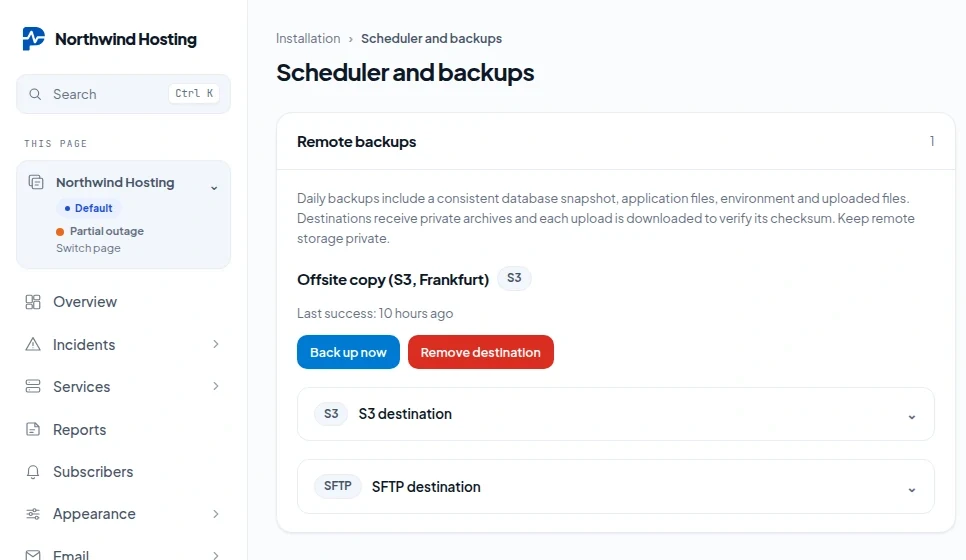
A remote backup sends a complete copy of your installation to storage of your own, once a day: an S3 bucket or an SFTP server. After each upload Pharos downloads the file again and compares it with the original, and only then calls it a success. Open Scheduler and backups under Installation. Only administrators of the installation can add, run or remove a destination.
What is in a backup
One zip file per run, named pharos- with the date, the time and a random part.
| In the archive | Detail |
|---|---|
| The database | On SQLite a consistent copy, checked for integrity, as database/database.sqlite. On MySQL a dump made with mysqldump, as database/database.sql. |
The application and .env | The code and your configuration, which includes APP_KEY. |
| Uploads and public files | Under public/, also when your public folder lives outside the application folder, as it does after the web installer. |
| Two notes | BACKUP-LAYOUT.json records where the public files came from. BACKUP-README.txt holds the restore steps. |
| Left out | vendor/, git data, caches, sessions, logs and the snapshots under Updates. |
Keep the storage private. The archive holds account data and your .env with its passwords and APP_KEY. Anyone who can read the bucket or the folder can read all of it.
Add a destination
Open S3 destination or SFTP destination, fill in the fields and press Add destination.
| S3 field | What to enter |
|---|---|
| Name | Your own label for the destination. |
| HTTPS endpoint (optional for AWS) | The address of an S3 compatible service. Leave it empty for Amazon S3. It must be HTTPS, without a user name, query or fragment in it. |
| Region, Bucket | As your provider names them. |
| Folder prefix | Optional. A folder inside the bucket. |
| Access key, Secret key | A key that may write and read objects in that bucket. |
| SFTP field | What to enter |
|---|---|
| Name | Your own label for the destination. |
| Host, Port | The server and its SSH port, 22 by default. |
| Username, Password | The account to sign in with. Sign in is by password; there is no field for a key file. |
| Verified server host fingerprint | The complete SHA256 or SHA512 fingerprint of the server's host key. Required. |
| Remote directory | An absolute path on the server, /backups by default. |
- The fingerprint is what proves you are talking to your own server. Pharos accepts it as OpenSSH prints it (
SHA256:followed by the base64 value) or as hexadecimal, with or without colons. Get it from the server itself or from your provider, not from a first connection you cannot check. Without a valid fingerprint Pharos does not connect. - Allow this destination on a private network: tick this when the storage has a private address, for example a server on your own network. Without it Pharos only connects to public addresses. This machine itself and link local addresses are refused either way.
- Keys and passwords are stored encrypted and are never shown again. To change a destination, remove it and add it again.
- An installation can have up to 10 destinations.
When it runs
- Every day at 02:45 UTC, from the cron line, to every destination. The command behind it is
php artisan pharos:backup-remote. - Back up now on a destination does the same at once.
- Each destination shows Last success. After a failure it shows one short line and no details: check the address, the credentials and whether the server can reach the storage.
- A delivery gets five minutes in total. A very large installation on a slow line may not fit in that.
- Pharos never deletes old backups at the destination. Set a lifecycle rule on the bucket or clean the folder yourself, or the storage fills up.
On SQLite the backup needs PHP's sqlite3 and zip extensions. On MySQL it needs the mysqldump program on the server, and tables of a transactional type such as InnoDB for a consistent dump. After the first run, open the archive and check that the database is in it.
Restore
- Stop the cron line, so nothing writes while you restore.
- Put the application files and
.envback. Keep the original APP_KEY: without it the stored destination credentials and the two factor secrets cannot be read. - Put the contents of
public/from the archive into the document root the site uses now.BACKUP-LAYOUT.jsontells you where they came from. - Put
database/database.sqliteback, or importdatabase/database.sqlinto MySQL. vendor/is not in the archive. Install the dependencies fromcomposer.lockwithcomposer install --no-dev.- Make sure
storage/andbootstrap/cache/exist and are writable, runphp artisan storage:link, and start the cron line again.
Try a restore on a separate installation before you rely on it.